

Dataset Viewer
The dataset viewer is not available for this subset.
Job manager crashed while running this job (missing heartbeats).
Need help to make the dataset viewer work? Make sure to review how to configure the dataset viewer, and open a discussion for direct support.
AMOD: A Large-scale Benchmark for RGB-T Multi-view Aerial Military Object Detection
Official website: https://unique-chan.github.io/AMOD-Project/
Dataset overview:
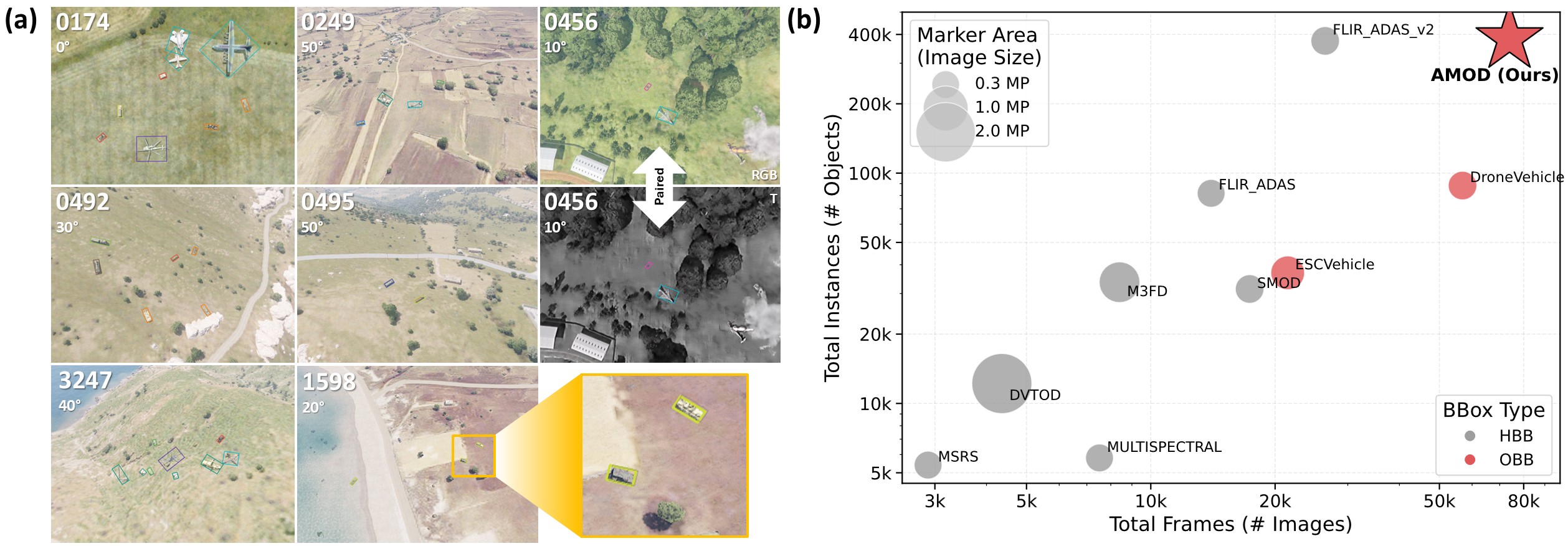
- (a) Sample images with annotations from our AMOD dataset.
- (b) Comparison of the AMOD dataset with existing RGB-T aerial object detection benchmarks.
Dataset structure:
- After download this repository, please unzip
AMOD-RGB.zipandAMOD-T.zip.
|—— 📁 AMOD |—— 📁 AMOD-RGB |—— 📁 train |—— 📁 train_imgs |—— 📁 0000 // scenario number |—— 🖼️ EO_0000_0.jpg // image at look angle 0 for scenario "0000" |—— 🖼️ EO_0000_10.jpg ... |—— 🖼️ EO_0000_50.jpg |—— ... |—— 📁 train_labels_v1.2 |—— 📄 ANNOTATION-EO_0000_0.csv // annotation file for "EO_0000_0.jpg" |—— 📄 ANNOTATION-EO_0000_10.csv ... |—— 📁 test |—— 📁 test_imgs |—— 📁 test_labels_v1.2 |—— 📄 train.txt // scenario number list for train split |—— 📄 val.txt // scenario number list for validation split |—— 📄 test.txt // scenario number list for test split |—— 📁 AMOD-T- Note that RGB and thermal modalities are perfectly aligned, with identical image counts, instance counts, and bounding box annotations in our benchmark.
- To facilitate modality-specific usage (e.g., RGB-only or thermal-only research), RGB and thermal (T) data are stored in separate directories, each containing identical annotations. Consequently, annotations from either EO or IR can be used interchangeably for the same scene.
- After download this repository, please unzip
- Downloads last month
- 105